
Best IPTV for Firestick in 2026: What to Look For Before Choosing a Subscription
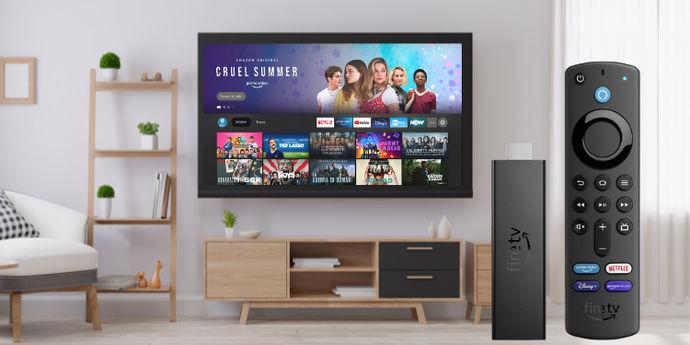
You’ve got your Firestick, your TV is ready, and you’ve finally found some time to relax. But there’s one problem: finding a streaming service that actually fits your needs.
If you’ve ever spent an evening switching between apps, searching for your favorite channels, or trying to figure out which IPTV subscription is worth paying for, you probably know how confusing the choices can be.
And let’s be honest: nobody wants to pay for a subscription and regret it a few days later.
That’s why choosing the right IPTV service for Firestick deserves a little research before spending your money.
Whether you’re in the USA, UK, or somewhere else, this guide will help you understand what matters, what to avoid, and how to choose an IPTV option that works with your entertainment setup.
Let’s get into it.
What Is IPTV and How Does It Work on Firestick?
IPTV stands for Internet Protocol Television. Instead of receiving television through traditional cable or satellite signals, IPTV delivers video content through an internet connection.
Amazon Firestick is a popular streaming device that connects to your television through an HDMI port and allows you to access compatible streaming applications.
When using IPTV on Firestick, there are two important things to understand:
IPTV Player: An application that organizes and plays a compatible playlist or streaming source.
IPTV Service: A provider that supplies the content and access details. The provider must have the appropriate distribution rights for the content it offers.
These are not the same thing.
Installing an IPTV player doesn’t automatically give you access to television channels, movies, or sports. You need a compatible and properly authorized content source.
Why Do So Many People Use Firestick for Streaming?
One reason Firestick is popular is its simple setup.
You don’t necessarily need to purchase an entirely new television to enjoy streaming applications. If your TV has an HDMI port, a compatible Fire TV Stick can turn it into a connected entertainment device.
Here are some reasons people choose it:
1. Simple Installation
Firestick is designed to make streaming accessible. Connect the device to your television, follow the setup instructions, connect to Wi-Fi, and explore compatible applications.
2. Compact Design
Unlike larger streaming boxes, Firestick is small and connects directly to your television.
It’s convenient for people who want a cleaner entertainment setup without adding another large device.
3. Access to Streaming Applications
Depending on your device model and country, you can access compatible applications through the Amazon Appstore.
You can check whether an application supports your particular model before installing it.
4. Convenient Remote Control
The included remote makes it easy to navigate menus, search for entertainment, and control playback without constantly reaching for your phone.
How to Choose the Best IPTV for Firestick in 2026
This is where things become important.
There are plenty of websites advertising IPTV subscriptions, but not every offer deserves your attention.
Instead of choosing the first service you find, look at these factors.
YOUR ENTERTAINMENT.
YOUR WAY.
Discover a better way to enjoy your favorite entertainment with IPTV4KPLUS.
1. Check Firestick Compatibility
Not every application works on every Fire TV device.
Before subscribing, confirm that the provider’s recommended application supports your particular Firestick model and operating system.
Amazon provides device specifications and compatibility information through its official website:
Amazon Fire TV Device Specifications
It’s worth checking this before paying for a subscription.
2. Look for Consistent Streaming Quality
Picture quality matters, especially when watching sports, movies, and live entertainment.
However, seeing the words HD or 4K in an advertisement doesn’t automatically guarantee the actual quality of a stream.
Ask about:
Available video resolutions.
Supported devices.
Internet speed requirements.
Whether a trial or demonstration is available.
How streaming issues are handled.
A reliable experience depends on the content source, your internet connection, and your device working together.
3. Understand the Subscription Plans
A cheap subscription isn’t necessarily the best deal.
Imagine paying for a full year and discovering that the service doesn’t meet your expectations.
That’s why it’s worth checking the subscription conditions before making a commitment.
Look for transparent information about:
Monthly and yearly pricing.
Payment methods.
Renewal conditions.
Refund policies.
Trial availability.
Customer support.
If possible, start with a shorter commitment until you’re confident the service meets your requirements.
4. Check Customer Support
Good customer support can make a big difference.
What happens if you cannot connect your device? Who helps if an application stops working? Is there a clear way to contact the provider?
Before purchasing, check whether the website provides real contact information and explains how technical support works.
Don’t ignore this part. It can save you a lot of frustration later.
5. Check Content Licensing
This is something every IPTV buyer should understand.
IPTV technology itself is simply a way of delivering television over the internet. However, the channels, movies, and sports content must be properly licensed or authorized for distribution.
A professional-looking website or a large channel list does not prove that a service has the necessary rights.
Choose providers that are transparent about their business, content rights, subscription conditions, and customer support.
IPTV Player vs IPTV Subscription: What’s the Difference?
Many Firestick users confuse these two things, especially when searching for the best IPTV app.
Here’s a simple comparison:
| IPTV Player | IPTV Subscription |
|---|---|
| Plays compatible streaming sources | Provides access to content |
| May support playlists | Supplies authorized content |
| May be free or paid | Usually follows a subscription model |
| Doesn’t automatically include channels | Availability depends on the provider |
For example, installing a media player doesn’t mean you automatically receive live TV channels.
You need a separate source that the player supports.
Understanding this difference helps you avoid paying for the wrong product.
How to Prepare Your Firestick for IPTV Streaming
Before choosing a subscription, make sure your device is ready.
Follow these simple steps:
Step 1: Check Your Firestick Model
Go to your device settings and look for the model information. Different generations may have different hardware and operating systems.
Step 2: Update Your Device
Check for available software updates. Keeping your device updated can help with application compatibility and general performance.
Step 3: Check Your Internet Connection
A stable connection is essential for streaming.
If possible, use an Ethernet adapter or place your router closer to your Firestick to improve connection stability.
Step 4: Check Available Storage
Streaming devices have limited storage. Remove applications you no longer use if you’re running low on space.
Step 5: Install Compatible Applications
Use the Amazon Appstore and check the compatibility information for your device.
Avoid installing unknown applications from untrusted websites.
Where Can You Explore IPTV Subscription Options?
If you’re currently comparing IPTV services, it’s worth taking time to explore different websites instead of making a quick decision.
For example, you can visit IPTV4KPLUS to explore its available subscription information and learn more about its offering.
You can also check IPTV Subscription 4K for additional IPTV subscription information and available options.
When comparing these websites, look at the details that matter most:
Device compatibility, especially Firestick.
Available subscription periods.
Streaming quality information.
Customer support.
Refund and cancellation conditions.
Content licensing and authorization.
Don’t make your decision based on advertising alone. Compare the information and choose an option that meets your expectations.
Common Mistakes to Avoid When Buying IPTV for Firestick
Even experienced streaming users can make mistakes when choosing a new subscription.
Here are a few worth avoiding.
Choosing Only Based on Price
The cheapest offer isn’t automatically the best one. Consider support, compatibility, content rights, and subscription conditions.
Ignoring Device Compatibility
Some applications may not support every Fire TV model. Always check before purchasing.
Believing Every 4K Advertisement
A provider advertising 4K doesn’t mean every channel or video is available in native 4K resolution.
Ask for clear information about actual video quality.
Paying for a Long Subscription Too Quickly
If you haven’t tested the service or reviewed its conditions, avoid committing to a long subscription immediately.
Forgetting About Your Internet Connection
Even a well-designed streaming service cannot overcome a weak or unstable home network.
Check your internet connection before assuming the provider is responsible for every buffering problem.
Frequently Asked Questions About IPTV for Firestick
What is the best IPTV for Firestick in 2026?
The best option depends on your Firestick model, streaming preferences, budget, and the provider’s content rights. Compare compatibility, streaming quality, customer support, and subscription terms before choosing.
Can I use IPTV on Amazon Firestick?
Yes. Compatible Fire TV devices can run supported streaming applications. The applications available depend on the device model, operating system, and Amazon Appstore availability.
Do I need an IPTV player and a subscription?
It depends on the service. Some licensed providers have their own applications, while other compatible players require a separate authorized playlist or content source.
Is IPTV legal in the USA and UK?
IPTV is a delivery technology and is not illegal by itself. However, providers must have the appropriate rights to distribute the content they offer. Laws and licensing arrangements can differ between countries.
Is Firestick good for 4K streaming?
Compatible Fire TV models support 4K playback when connected to a suitable 4K television and used with compatible content and applications. Check the specifications of your particular model.
Can IPTV work on an older Firestick?
It depends on the model and the application. Older devices may have limitations involving memory, storage, operating system versions, and application compatibility.
How do I avoid IPTV scams?
Research the provider, check its contact information, read its refund policy, understand the payment conditions, and look for clear information about content authorization. Be cautious of unrealistic promises.
Final Thoughts: Choose Your Firestick IPTV Experience Carefully
Your Firestick should make entertainment easier, not turn choosing a streaming service into another headache.
The good news is that finding a suitable option doesn’t have to be complicated.
Start by checking your device, understanding the difference between IPTV players and subscriptions, and comparing providers based on real information rather than marketing promises.
If you’re researching available options, take a look at:
Compare the available details, check compatibility, and make sure the content is properly authorized before subscribing.
Because at the end of the day, the best streaming setup isn’t the one with the biggest promises. It’s the one that fits your device, your budget, and the way you actually enjoy watching TV.
YOUR ENTERTAINMENT.
YOUR WAY.
Discover a better way to enjoy your favorite entertainment with IPTV4KPLUS.